Use this guide to identify the likely cause of a fault before beginning disassembly. Confirm the symptom, identify the probable cause, then follow the referenced short procedure or service manual.
Error Modes (LED indicator codes)
When the system enters an error mode, the power indicator on the interface flashes red. The number of LEDs flashing red identifies the error mode. The system automatically stops the motor in every error mode below.
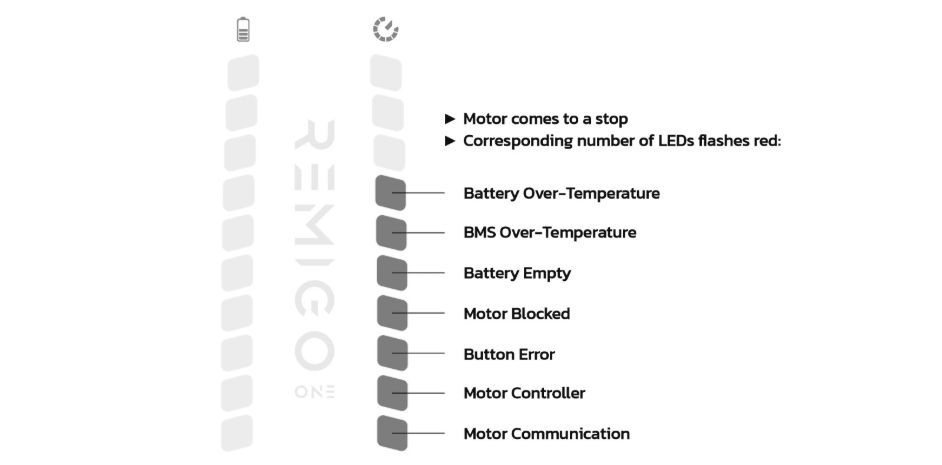
Power indicator at error modes
| Error Mode | LEDs flashing red | Meaning | Action |
|---|---|---|---|
| 1 | 1 | Motor communication error — communication failure between the control system and the motor | Perform a system reset. If the problem persists, consult your dealer for further assistance. |
| 2 | 2 | Motor controller error — malfunction or fault in the motor controller | Perform a system reset. If the problem persists, consult your dealer for further assistance. |
| 3 | 3 | Button error — malfunction or fault of the buttons | Check if the buttons are blocked. Perform a system reset. If the problem persists, consult your dealer for further assistance. |
| 4 | 4 | Motor blocked — blocked propeller shaft | Check the propeller and shaft for obstruction; see Replace propeller / Replace propeller shaft and rotor if damage is found. |
| 5 | 5 | Battery empty — SOC 0% | Recharge the battery immediately to prevent deep-discharge and to reactivate the motor. |
| 6 | 6 | BMS over-temperature — Battery Management System temperature too high | Allow the battery to cool down before further use. |
| 7 | 7 | Battery temperature limits exceeded — battery temperature outside the safe operating range (too hot or too cold) | Ensure the battery is within the specified temperature range before use. |
NOTE
Source: Error Modes reference (user manual). “Blocked Propeller” and “Battery and Charging” chapter references in the original source point to the end-user manual, not this service manual.
Motor does not run
| Symptom | Probable cause | Action |
|---|---|---|
| No response to throttle | Battery not connected or discharged | Check battery connection; charge battery |
| No response to throttle | Battery cable disconnected internally | Replace battery — inspect cable during removal |
| No response to throttle | Interface not seated / silicone seal damaged | Replace interface |
| No response to throttle | Signal cable fault | Check and replace motor signal cable |
| No response to throttle | Power cable fault | Check and replace motor power cable |
| Motor controller fault indicated by interface | PCBA motor controller failed | Replace motor controller |
Unusual noise or vibration
| Symptom | Probable cause | Action |
|---|---|---|
| Rattling or clicking from propeller area | Shear pin broken | Replace shear pin |
| Propeller wobble or imbalance | Propeller damaged | Replace propeller |
| Grinding noise from drivetrain | Bearing worn or failed | Replace motor bearings |
| High-pitched whine from motor | Bearing contaminated with water or debris | Replace motor bearings |
| Vibration at all speeds | Propeller shaft bent | Replace propeller shaft and rotor |
Water ingress
| Symptom | Probable cause | Action |
|---|---|---|
| Water inside motor housing | Radial shaft seal worn or damaged | RemigoOne Go&DE2 Drivetrain Service Manual — replace seals |
| Water inside motor housing | O-ring on housing lid damaged or missing | RemigoOne Go&DE2 Drivetrain Service Manual — replace O-ring |
| Water inside motor housing through interface area | Interface silicone seal failed | Replace interface |
| Corrosion on housing exterior | Anode depleted | Propeller and anode replacement |
Overheating / performance loss
| Symptom | Probable cause | Action |
|---|---|---|
| Motor shuts down under load | Thermal protection activated — poor heat transfer | Check thermal paste on heat sink; Replace motor controller if PCBA damaged |
| Reduced power output | Stator or rotor fault | Replace motor incl. stator |
| Interface overheats | Battery signal cable fault | Replace interface — no standalone battery signal cable replacement is available |
Interface and button issues
| Symptom | Probable cause | Action |
|---|---|---|
| Interface buttons unresponsive | Button harness fault | Replace interface — no standalone button harness replacement is available |
| Interface display incorrect or flickering | Signal cable fault | Check and replace motor signal cable |
| BMS warning on interface | BMS firmware or configuration | Update BMS |
Propeller and shaft
| Symptom | Probable cause | Action |
|---|---|---|
| Propeller does not turn despite motor running | Shear pin sheared | Replace shear pin |
| Propeller slips on shaft | Safety nut loose or missing | Propeller and anode replacement — re-torque safety nut |
| Propeller damaged (chips, bent blades) | Impact damage | Replace propeller |
NOTE
If a fault is not listed above or persists after following the referenced procedure, contact the Remigo service team for further diagnosis.